VRChat Emoji Maker
Free. No watermark. No sign-up.
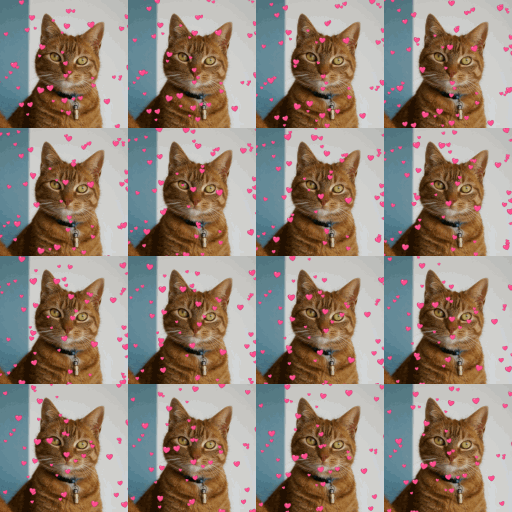
Example VRChat emoji sprite sheet
How to make a VRChat emoji
- Press Choose image and pick a GIF.
- Leave Grid on Automatic, or pick a grid yourself.
- Switch Preview between Animation and Sprite sheet to check both.
- Press Download PNG.
How VRChat animated emoji work
An animated emoji is one 1024 x 1024 picture with the frames in a grid of squares, read left to right, then top to bottom. A 2x2 grid holds 4 frames of 512 px, 4x4 holds 16 of 256 px, and 8x8 holds 64 of 128 px, the most there can be. The frame count and FPS are chosen after upload or read from the file name. Enable Sprite Sheet Mode has to be checked or the emoji won't animate. Animated emoji need a VRC+ subscription.
VRChat emoji maker settings
Grid: Automatic picks the smallest grid that holds every frame, up to 8x8. If the GIF has more frames than the grid, frames are picked evenly through it. A smaller grid gives bigger, sharper frames, but fewer of them.
Fit: Fit inside shows each whole frame in its square. Fill and crop fills the square and cuts off the edges.
Transparent background keeps empty space see-through. Turn it off to fill it with the Background color.
Preview: Animation plays the frames at the emoji's size and speed. Sprite sheet shows the whole PNG.
The VRChat emoji file name
The PNG is named like emoji_16frames_12fps.png. The FPS is the frame count divided by the GIF's length, so the emoji plays at the GIF's speed.
VRChat emoji maker limits
A GIF larger than 1000 px on its long side is scaled down to 1000 px. A GIF with more than 300 frames is thinned to 300 or fewer before frames are picked.