Deep Fried Meme Maker
Free. No watermark. No sign-up.
Example deep fried meme
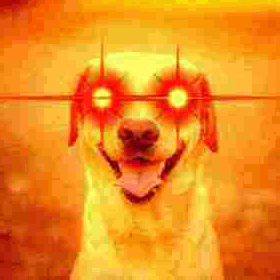
How to make a deep fried meme
- Press Choose image and pick a picture or a GIF.
- Turn up Fry level, Crunch and Noise until it looks burnt enough.
- Add a Bulge and Lens flares and move them onto a face.
- Press Download JPG, or Download GIF for an animated GIF.
Deep fried meme settings
Fry level turns up saturation and contrast and pushes colors toward orange and red.
Crunch is real JPEG compression at a low quality: blocky squares, smeared color and halos around edges. From 4 up it runs twice, from 8 three times.
Noise adds colored grain. A high Crunch smears it into blotches.
Bulge puffs out a circle like a fisheye lens. The dashed circle in the preview isn't in the download.
Lens flares adds glowing red and white flares. With Two, Flare spacing sets how far apart they are, so you can put one on each eye. They get fried along with the picture.
Horizontal position and Vertical position move the spot the bulge and the flares share.
What deep fried memes are for
A deep fried meme looks edited and saved so many times it burnt: loud colors, crunchy compression, glowing eyes. People use one to make a reaction louder, or for the absurd look.
Deep fried meme downloads and limits
A picture downloads as a JPG, so a transparent one gets a white background. An animated GIF downloads as a GIF with every frame fried and its speed kept, and transparent parts stay transparent.
Pictures and GIFs larger than 480 px are scaled down to 480 px on the long side. GIFs with more than 120 frames are thinned to 120 or fewer and keep their length.