Speech Bubble GIF Maker
Free. No watermark. No sign-up.
Example speech bubble GIF
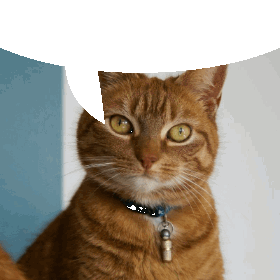
How to make a speech bubble GIF
- Press Choose image and pick a picture or a GIF.
- Pick the bubble fill: transparent, white or black.
- Set the tail position and the bubble height.
- Press Download GIF.
What is a speech bubble GIF?
It is a picture with a speech bubble shape across the top and a tail pointing down at whoever is in it. Post it in a chat and the message above it looks like it is coming out of the bubble, as if the picture said it. The Discord speech bubble GIF is a reply that makes fun of what was just posted.
Speech bubble settings
Bubble fill starts as Transparent. The bubble is cut out of the picture, so the chat background shows through in dark mode and light mode alike. White and Black paint the bubble a solid color.
Tail position moves the tail to the left, center or right. Put it over the face or the mouth of the speaker.
Bubble height is how far down the bubble reaches. A taller bubble covers more of the top of the picture.
Pictures and GIFs
A still picture comes out as a one-frame GIF. Upload an animated GIF and the bubble goes on every frame, and the GIF keeps playing at the same speed.
Tips for a speech bubble GIF
- Use a picture with some empty space at the top, since the bubble covers it.
- The GIF keeps your picture's shape. Big pictures are scaled down to 480 px on the longest side.